

BuzzCasting · Software by TouchFlows
The live social wall and command center that brings every screen to life.
BuzzCasting turns social posts, listening data and business KPIs into pixel-perfect live walls: synced across multiple screens, moderated from your phone and scheduled to the minute.
Works with your listening tools · Public and private screens · Team and support in English and French
Features
The display layer your data deserves
Listening suites are great at collecting data. BuzzCasting is built to show it: custom, animated, synchronized and safe for public screens.
Pixel-perfect design
A drag-and-drop editor and component library keep every card on brand.
Multi-screen sync
Every screen receives the same presentation and slide at the same instant, so the whole wall changes in unison.
Moderate from anywhere
Real-time, delayed, approved-only or replay. Moderate live from your phone.
Per-screen scheduling
Decide which presentation runs on which screen, and when. A TV wall can follow whatever show is on air.
Stacked widgets and animations
A chart for 20 seconds, then posts. 15 transitions, at your pace.
Rolling data windows
From 5 minutes to 6 months per component: one slide can combine the last hour with the last 30 days.
Any data source
Social, listening, CRM, sales, customer incidents: the wall becomes your executive dashboard.
AI-powered insights
Summaries and sentiment readouts that scroll alongside your charts and posts.
Per-widget safety filters
Face blurring, deepfake detection, NSFW filtering and anonymization, switchable widget by widget.
Word cloud filters
Profanity, personal names and off-topic terms never make it to the screen.
Card layout
Show or hide date, author, avatar and image; go with one large card or a full grid.
Remote control
Control every screen from the back office and share presentations with a link.
Back office
Run the show from one place
Build presentations, moderate the feed and control every screen from a single back office, with a guide your team can follow.
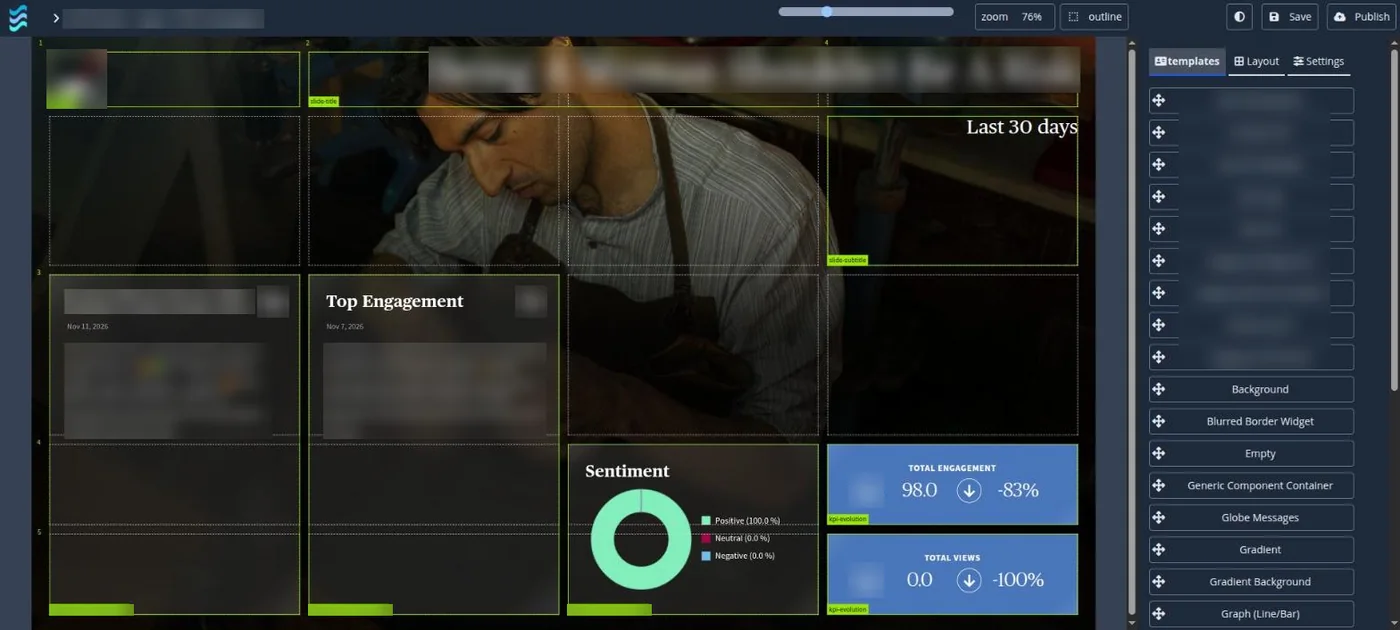
Editor
A live social wall, built in minutes
Drag and drop components: metrics, sentiment and a post grid that refreshes with every new message, all in your brand colors.
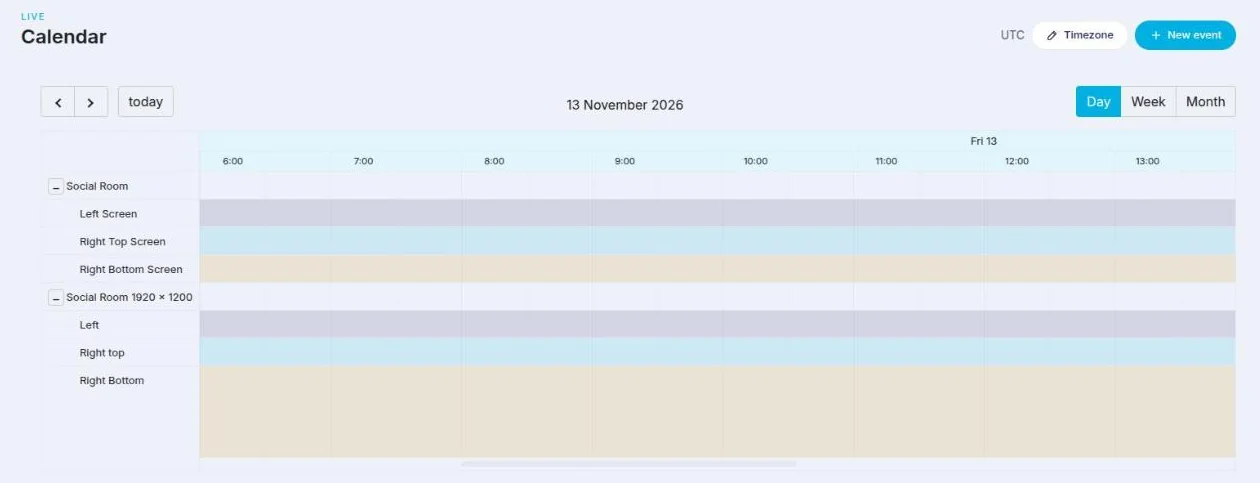
Scheduling
Every screen gets its own row in the calendar
Choose which presentation runs on which screen, and when. Screens are grouped by room, with day, week and month views.
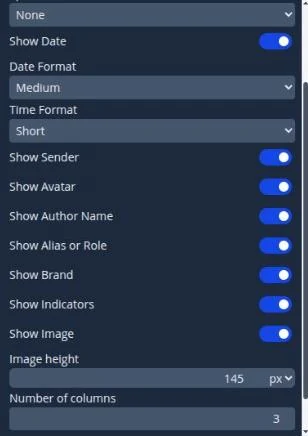
Message cards
Fine-tune every card
Show or hide date, author, avatar and image, set the image height and choose how many columns the grid has.
Use cases
Built for the places where it matters
From a festival main stage to a government media office.
Events and public screens
Trade shows, concerts, conferences, lobbies. Moderated, brand-safe and live in minutes.
TV and broadcast
One wall per show, displaying online reactions to whatever is on air.
Brand and comms war rooms
Conversations, sentiment and top posts, readable from the back of the room.
Agencies and media
Walls in each client’s colors, with a component library per client.
Executive dashboards
CRM, sales and customer incidents on the same screens as your social analytics.
Crisis and situation rooms
Font sizes set for the back of the room, moderation right down to the word cloud. The wall runs on its own for as long as you need.
Our method
A social wall is a medium, not a screen full of data
People glance at it in passing, often with the sound off, from a few meters away, for a few seconds. So we design the story before we configure the tool.
01
Scoping
Who walks past the screen, what impact you’re after, the story screen by screen, and data that actually exists.
02
Motion
Pacing, transitions and movement for every slide, brought together in an animated storyboard.
03
Brand pack
Brand guidelines and screen constraints handed to the designer with a complete brief.
04
Review
Mockups challenged slide by slide, at real size and real viewing distance.
05
Final sign-off
Moderation rules and filters locked in, then a dated sign-off that becomes the spec.
06
Setup and launch
Configured and tested on the actual screens with live feeds: no screen goes live empty.
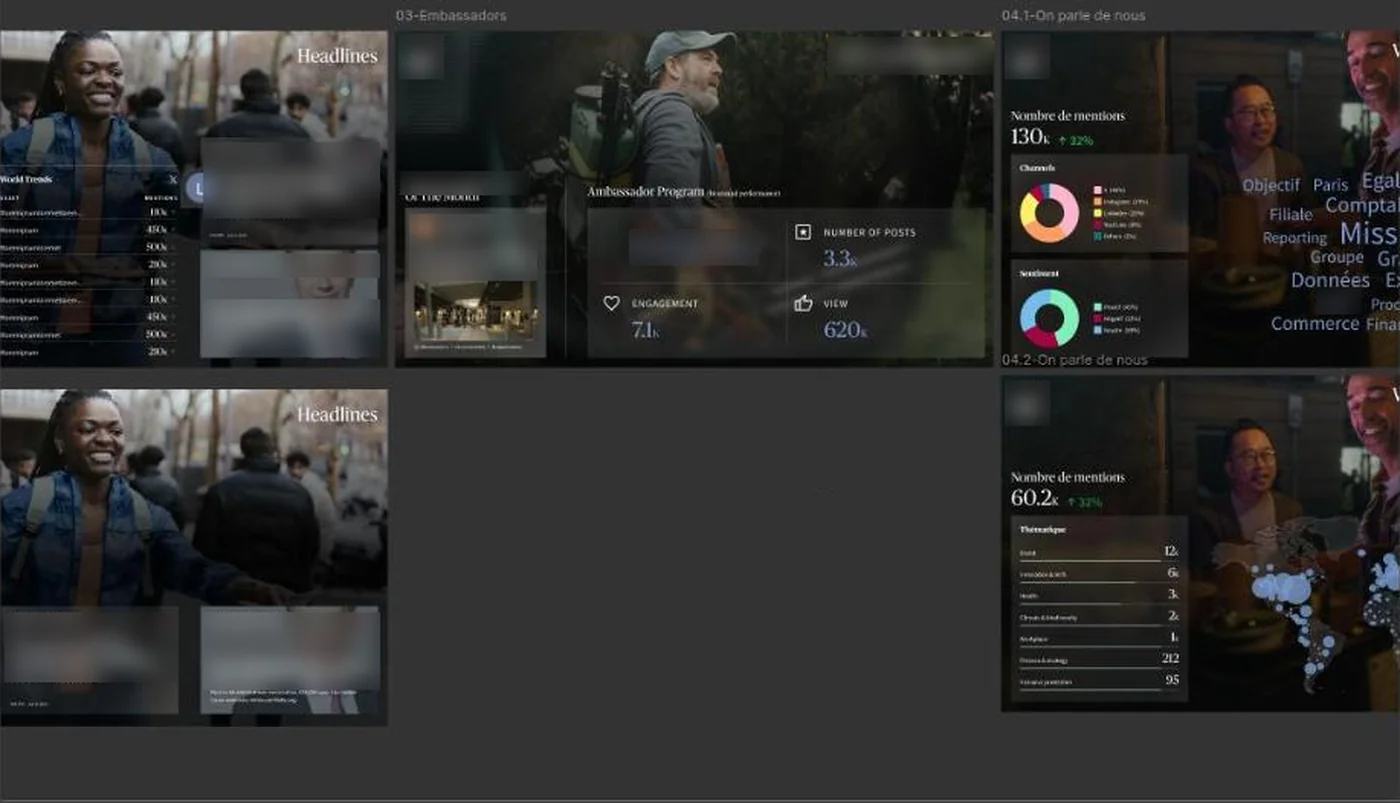
Mockups
Design and review before you build
Mockups are reviewed screen by screen, at real size and distance. The approved design is then assembled widget by widget in the BuzzCasting editor.
Our readability rules
3 × 5
no more than 3 lines of 5 words per slide
5–8
clear messages per loop, not an overloaded screen
6–9
posts on screen at once, so it stays readable
1 in
of letter height for every 10 ft (3 m) of viewing distance
After launch, we revisit the story every 2 to 4 months, check that data keeps flowing and make sure the wall is still doing its job.
How it works
From data to live wall in four steps
01
Connect your data
Plug BuzzCasting into your listening solution or any other source.
02
Design your slides
Drag and drop components, then set time ranges, animations and card layouts.
03
Assign and schedule
Choose which presentation runs on which screen, and when.
04
Go live and moderate
Stay in control from your phone while the wall runs itself.
BuzzCasting by the numbers
4
moderation modes: real-time, delayed, approved-only and replay
15
animated transitions, with your own interval and speed
5 min to 6 months
of live data window, adjustable per component
EN · FR
team and support in English and French
FAQ
Your questions, answered
What is BuzzCasting?
A live display layer. It turns social posts, listening data and business KPIs into walls and dashboards for public screens, events, TV studios, war rooms and executive offices.
Do I need to replace my listening tool?
No. BuzzCasting reads data from the tools you already use and adds the display layer on top: custom design, animation, scheduling, moderation and multi-screen sync.
Can I moderate posts before they appear?
Yes, with four modes: real-time, delayed, approved-only, and replay of previous days. Moderation also works from a phone, during the event.
How do multiple screens stay in sync?
BuzzCasting tells every active screen which presentation and slide to show at the same instant. A 6 × 2 video wall switches theme everywhere at once.
Can the wall change on its own throughout the day?
Yes. A schedule sets each screen’s presentation and timing, for example online reactions to the show currently on air.
Can I display more than social media?
Yes: CRM, sales, customer incidents or any other source. The same wall becomes an executive dashboard.
Can the wall filter risky or personal content?
Yes. Face blurring, deepfake detection, NSFW filtering and anonymization can be turned on widget by widget. For European audiences, also check GDPR requirements before displaying photos or identifiable usernames.
How do you design a social wall?
We start from the audience and the goal, not the widgets: scoping, motion design, brand guidelines, full-size mockup reviews, a dated sign-off, then setup and testing on the actual screens.
Let's put your data on the big screen
Tell us about your event, your show or your space. We’ll reply in English or French.